![Main - White500.png]](https://help.eletive.com/hs-fs/hubfs/Main%20-%20White500.png?height=35&name=Main%20-%20White500.png)
Target audience: Administrators
Comment moderation uses AI to scan survey comments for personal data that could violate GDPR, such as names, health information or salary details. A flagged comment is not published. The flagged comment goes to the "Flagged comments" list, where an Administrator decides if it needs to be redacted before being released for managers to see.
Only Administrators can turn on Comment moderation and review flagged comments.
Turn on Comment moderation
-
Navigate to Settings in the left side bar.
-
Open the "Anonymity"-tab.
-
Turn on the "Comment moderation"-toggle.
Which comments are moderated
Comment moderation applies to all comments and open-text answers, except whistleblower comments. Whistleblower comments are never moderated.
A comment is moderated if Comment moderation is turned on at the moment the employee submits the comment. Comments submitted before Comment moderation was turned on are not moderated.
Who can see flagged comments
Flagged comments that have not been reviewed are hidden from managers, reports and AI features, such as Comments AI.
Managers, reports and Comments AI only see a flagged comment after the comment is released. Comments AI analyzes the version of the comment that was released, either the original or the redacted version.
How Administrators are alerted on new flagged comments to review
Administrators receive a "Flagged comments require action" notification when comments are flagged. The notification is sent once per hour at most and covers all comments flagged in that hour, not one notification per comment.
Upon logging in to Eletive, a "Flagged comments require action" callout appears at the top of the Comments tab, where the survey comments normally are shown. The callout is only visible to Administrators. Press Review comments to open the "Flagged comments" list.
You can also open the list from Settings › Anonymity by pressing the Show comments-button under the Comment moderation toggle.
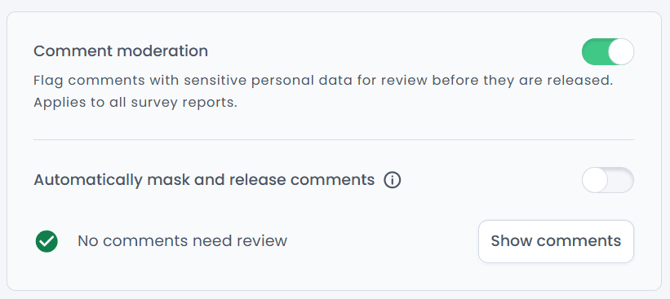
Review flagged comments
The "Flagged comments" list has two tabs: Pending and Handled comments. Each comment shows the question, the "Original" text and the "Redacted version", where personal data is replaced by [REDACTED], see the fictive example below:
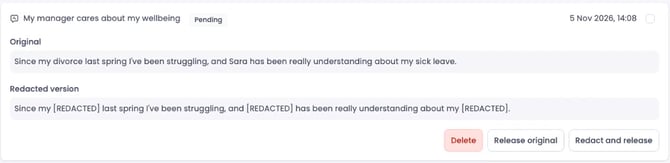
Flagged comments stay in the "Pending" tab until an Administrator handles them. Pending comments do not expire and are not deleted automatically.
For each pending comment, choose one of the following:
-
Redact and release: The comment is published with personal data replaced by [REDACTED]. Managers see only the redacted version.
-
Release original: The comment is published exactly as the employee wrote it. Use "Release original" when the flagged content is not sensitive in context.
-
Delete: The comment is removed entirely. Managers and the employee can no longer see the comment. You need to confirm the deletion, and a deleted comment cannot be restored.
Handle several pending comments at once
Select comments with the checkboxes, or use Select all, then press Release selected, Redact and release selected or Delete selected. See the fictive example below:
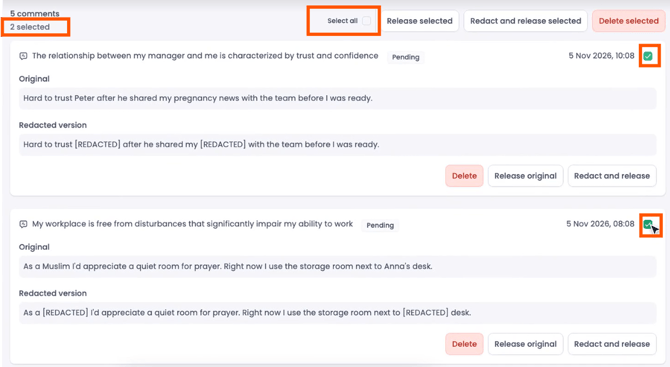
Select all selects every pending comment, not only the comments shown on screen.
Handled comments
The Handled comments tab shows every reviewed comment with a badge stating "Redacted and released". For a comment released in redacted form, you can still press "Release original" or "Delete". Comments that were released automatically stay in the review history for 90 days.
Release flagged comments automatically
Turn on "Automatically redact and release comments" to skip manual review. Every flagged comment is then redacted and released automatically. The toggle is available in Settings › Anonymity and at the top of the "Flagged comments" list.
Comments that were already in the "Pending" tab before the "automatically redact and release comments"-toggle was turned on, are not released automatically. Review those comments manually.
Note: If you turn off Comment moderation, all comments in the "Pending" tab are released with their original text within one hour.