![Main - White500.png]](https://help.eletive.com/hs-fs/hubfs/Main%20-%20White500.png?height=35&name=Main%20-%20White500.png)
Target audience: administrators, analysts, managers
When account data access is enabled, Copilot can read data from your acocunt such as engagement surveys, custom surveys, lifecycle surveys, 360 feedback surveys, actions, and objectives. You can ask Copilot to pull out insights, surface trends across survey types, and dentify correlations between report data and actions createdin different segments — using plain language, without needing to navigate between reports manually.
AI Credits
All requests processed by Eletive Copilot use AI Credits. Learn more about AI Credits here.
Note: Comments AI operates independently from Copilot and does not require account data access to be enabled. It also does not consume any AI Credits. Read more about Comments AI.
Data access and anonymity
Copilot's access to data is always limited to the data you already have permission to view in your own account, thus there is no risk of a user accessing data outside their existing report permissions.
Note: Copilot currently cannot read current account settings for troubleshooting purposes. However, Copilot can guide you on correct setup for various features and link you to the relevant Help Center articles.
Enable or disable Copilot with account data access
Eletive Copilot has access to your account data by default. You can change this setting per role.
-
Navigate to Settings / Features
-
Check that Copilot is enabled under the AI section
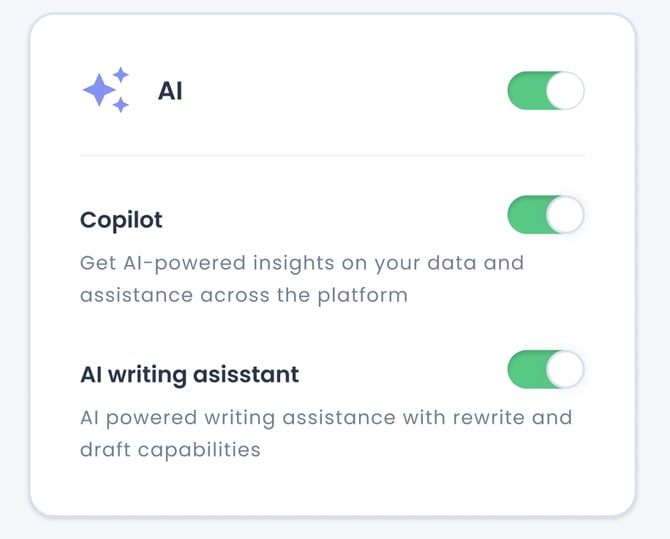
- Once the feature is enabled, a new tab called AI will be visible under Settings.
-
Go to Settings / AI. Under the Copilot section, enable or disable account data access for Copilot independently for each role.
Note: Employees do not currently have access to Eletive Copilot with account data access.
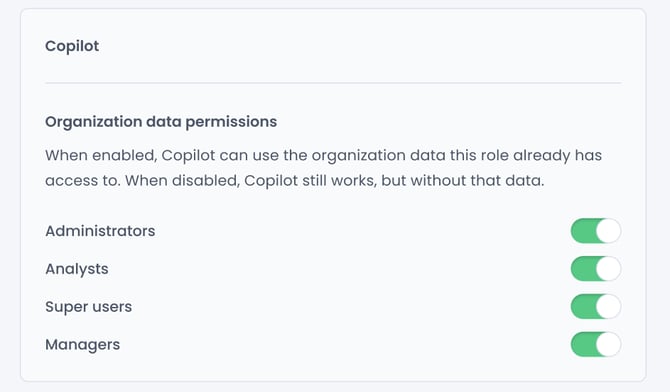
Note: When Copilot is enabled under Features but no account data access has been activated, Copilot will still be accessible. However, it will only draw on Eletive's full Help Center to answer questions about features, settings, and platform setup in your preferred language. For an introduction to Eletive Copilot, see this article.