![Main - White500.png]](https://help.eletive.com/hs-fs/hubfs/Main%20-%20White500.png?height=35&name=Main%20-%20White500.png)
Suggested Actions
This feature gives your managers and employees an opportunity to easily work with actions specifically connected to a driver and question. You can either utilize Eletive's suggested actions written by organizational psychologists or create your own suggested actions as an administrator in Eletive. When turning the feature "Actions" on, you will have the opportunity to also turn on "Suggested actions". The suggested actions will appear when you click on advice for each question within a driver. The suggested actions can also be added to an action plan by clickin Add to action.

Suggested actions in the Me-report
As an employee, you have the opportunity to read and add suggested actions when viewing your advice for each question within the drivers . These suggested actions are based on what you as an employee can do to work with the specific questions. You have the opportunity to add the suggested action to your own action plan and work with them privately.
Suggested actions in a segment-report
The suggested actions are created from a manager’s perspective and are designed to help and inspire managers when working with the results. They appear when you click on Advice and then General advice for each question within a driver.
You have the opportunity to directly add the Suggested Actions to the segment’s action plan by clickin Add to action. When you have added the suggested action, you are able to work with the action plan together with your team and adjust different settings.
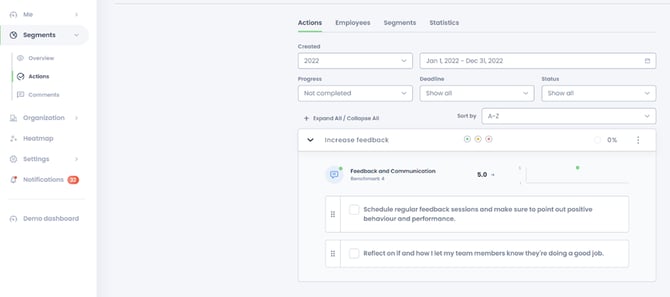
As an administrator, you have the opportunity to create customized suggested actions for managers and employees to view and add to their action plans.
In order to create your own suggested actions, go to Settings → Features → Engagement (⚙) and open the Questions tab. Within questions, you are able to edit a question by pressing the three dots to the right of the question. When editing the question you can also see the advice for employees and segments written by organizational psychologists. Here you are also able to add your own suggested actions for each question.
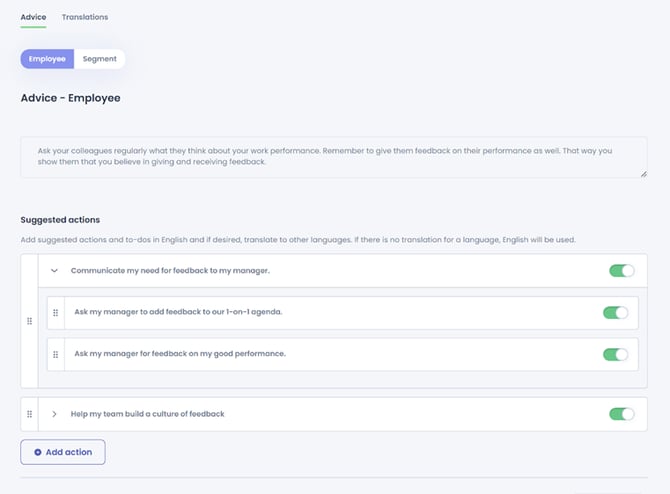
The Suggested actions are available in all languages. If you have created your own suggested actions, you have the possibility to translate them in the platform.